





Robotic pool cleaner maintenance is five tasks done weekly, rinsing the filter, inspecting the brushes, clearing the impeller, checking the cable, and testing performance, plus four seasonal adjustments for spring opening, peak summer, fall debris, and winter storage. Done consistently, a well-built cleaner runs 7 to 10 years instead of failing in 2 or 3.
This guide covers the full weekly checklist, what changes each season, how to troubleshoot common problems, the mistakes that cut lifespan short, and when each part needs replacing.
The Weekly Robotic Pool Cleaner Maintenance Checklist
Five tasks, run once a week during pool season. Once you have a routine, the checklist takes about 5 to 10 minutes; the first few times take longer while you learn where the impeller chamber and panels are on your model. Catching issues here prevents most of the breakdowns that get robotic cleaners retired early.
Rinse the Filter Basket After Every Cycle
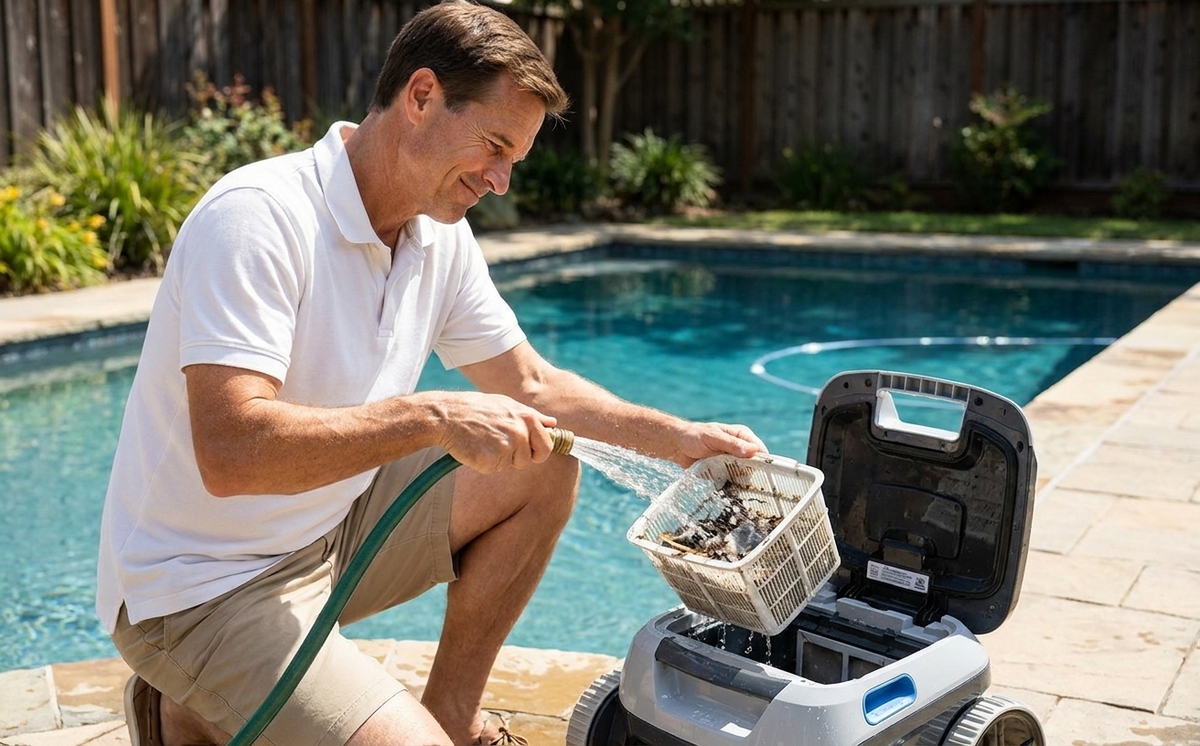
Pop the basket out as soon as the cycle ends and rinse it with a garden hose from the outside in, which pushes debris back out of the mesh instead of driving it deeper. Do not use a pressure washer, as it can tear the mesh. A clogged filter is the most common cause of weak suction, so this 30-second habit is the single highest-impact thing you can do.
Inspect the Brushes and Tracks for Wear
Look for flattened bristles, missing sections, or cracks on the brushes, and check the tracks or wheels for tread that is neither hardened nor worn smooth. Worn brushes scratch pool surfaces without scrubbing off dirt, and worn tracks make the cleaner slide instead of grip. Both affect cleaning long before they look obviously broken.
Check the Impeller for Hair and Debris
The impeller generates the suction, and hair, string, and long fibers wrap around its shaft over time, cutting suction so gradually that owners miss it until the cleaner stops picking up debris. Follow your manual to access the impeller chamber, remove anything wrapped around the shaft, and rotate it by hand to confirm it spins freely. Check it weekly, not when performance has already dropped.
Examine the Cable for Damage
For corded models, run your hand along the cable looking for kinks, exposed wiring, or brittle insulation. The cable is the most common failure point on robotic cleaners, and small nicks now become motor shutdowns later. If you see exposed copper or cracked insulation, stop using the cleaner; this is a shock hazard around water, not a DIY fix.
Test Suction and Movement
Drop the cleaner back in the pool for two to three minutes after the checklist. Watch for steady movement, strong suction at the intake, and smooth wall climbing if your model climbs. Anything weaker than last week is the signal to revisit the first four items.
How Maintenance Differs for Corded and Cordless Models
Most of the checklist is the same for every robotic cleaner, but two areas depend on the power type. Knowing which applies to your model keeps the routine focused.
|
Maintenance Point |
Corded Models |
Cordless Models |
|---|---|---|
|
Power component |
Inspect the cable weekly for kinks and exposed wire |
No cable; keep the charging port clean and dry |
|
Power supply |
Keep the control box dry and out of direct sun |
Keep the battery and charger dry; charge before use |
|
Off-season |
Coil the cable loosely, store the power supply indoors |
Store the battery at 40 to 60 percent, top up every 2 to 3 months |
For cordless cleaners, battery habits matter as much as the filter: charge fully before use, avoid leaving the battery at zero for long periods, and never store it fully drained. A neglected battery is the fastest way to shorten a cordless cleaner's usable life.

Is Robotic Pool Cleaner Maintenance a Lot of Work?
No, robotic pool cleaner maintenance is light. The routine is a quick filter rinse after each cycle, a 5 to 10 minute weekly check, and a few seasonal tasks. Running costs are low too: a typical owner spends roughly 50 to 100 dollars a year on replacement parts, mostly filters, with brushes and tracks lasting one to two seasons. There is no plumbing to service and no booster pump to maintain.
How the Workload Compares to Traditional Cleaners
Robotic cleaners are the lowest-maintenance automatic option, which is the other half of why they cost more upfront. A suction-side cleaner sends every bit of debris into the pool's main filter, so that filter clogs faster and needs cleaning or backwashing more often. A pressure-side cleaner adds a booster pump as one more component to service. A robotic cleaner keeps debris in its own basket, so the upkeep is mostly just rinsing that basket, work you do at the poolside in under a minute, not work spread across the pool's plumbing.
Is the Maintenance Worth It?
For most owners, yes. The weekly checklist is the difference between a cleaner that lasts 7 to 10 years and one that fails in 2 or 3, so the few minutes a week protect a purchase worth several hundred to a few thousand dollars. The honest catch is consistency: a robotic cleaner rewards a steady routine and punishes neglect, so it suits owners willing to spend a few minutes each week more than those who want zero involvement.
Seasonal Robotic Pool Cleaner Care: Spring to Winter
The weekly checklist is the year-round baseline. On top of it, each season adds one adjustment, summarized below and detailed after.
|
Season |
Main Focus |
|---|---|
|
Spring |
Full post-winter inspection before the first cycle |
|
Summer |
Peak-use rinsing; rinse the filter every cycle |
|
Fall |
Clear leaf debris fast; deep-clean before storage |
|
Winter |
Clean, dry, and store the cleaner properly |
Spring: Full Post-Winter Inspection
Before the first cycle of the season, visually inspect every component, housing, cable, filter, brushes, and tracks, for cracks, rodent damage, or anything that dried out over winter. For cordless models, fully charge the battery from its winter storage level. Run a 5 to 10 minute test in shallow water before committing to a full clean, and replace any part that showed wear at the end of last season.
Summer: Peak-Use Habits
Run the cleaner two to three times per week and rinse the filter after every cycle. Sunscreen residue and pollen build up fast and clog the mesh quicker in summer heat. After any pool shock or heavy chlorine addition, wait 24 to 48 hours before running the cleaner. If the filter looks oily from sunscreen, soak it briefly in warm water with a few drops of dish soap, then rinse thoroughly.
Fall: Clear Debris Fast, Prep for Storage
Leaf season puts the heaviest load on the filter, so clear the basket mid-cycle if it fills fast, since a full basket stops collecting debris long before the cycle ends. Before closing the pool, do one final thorough cleaning run, then deep-clean every component and replace anything worn now rather than next spring.
Winter: Clean, Dry, and Store Properly
When water temperature drops below 50°F (10°C), pull the cleaner out for the season. Drain all water from the housing, dry it completely (cloth first, then air-dry 24 hours), and store it indoors between 41°F and 113°F. For cordless models, store the battery at 40 to 60 percent charge and top it up every 2 to 3 months. For the full off-season walkthrough, see our guide on how to store a robotic pool cleaner.
How to Troubleshoot Common Robotic Pool Cleaner Problems
Most performance problems have simple causes, and they usually trace back to the filter, the impeller, or water chemistry. Check those three before assuming a major malfunction, and see our full robotic pool cleaner troubleshooting guide for problems beyond the common ones below.
Weak or No Suction
Almost always a clogged filter or debris wrapped around the impeller. Rinse the filter first; if that does not fix it, check the impeller for wrapped hair or fiber. These two cover the large majority of suction complaints. If both are clear and suction is still weak, the pump motor may need professional service.
Cleaner Will Not Climb Walls
Start with the filter, since reduced suction affects wall climbing first, then check the brushes for wear. If both are fine, verify that pool pH (7.2 to 7.6) and chlorine (1 to 3 ppm) are in normal range, since off-balance water can throw off wall suction on some models.
Cleaner Stops Mid-Cycle
For corded models, this is usually the GFCI outlet tripping from a ground fault, often water intrusion into the power supply or cable; unplug, let everything dry fully, reset the GFCI, and try again. For cordless models, the battery may be in thermal protection from running too long in hot water, so let it cool for 30 minutes before restarting.
Cleaner Gets Stuck in Corners
Check the brushes and tracks for entanglement first, since hair or debris in the drive mechanism changes the turning radius. If the cleaner is consistently stuck in the same corner, that may be a pool shape the model struggles with, such as tight 90-degree corners or step transitions. Some cordless models offer a navigation reset through the app.
Cleaner Will Not Power On
For corded models, check the GFCI outlet first, then test a different outlet, then check the power supply connections. For cordless models, the battery may be in deep-discharge protection, so connect the charger for 30 minutes before testing, even if the indicator stays dark. If power is reaching the unit and it still will not start, the internal motor or control board likely needs service.
When a Problem Means Repair or Replacement
Once a problem points to the motor, control board, or another internal part, the next decision is repair versus replacement. Check the warranty first: if the cleaner is still covered, contact the manufacturer before paying for any repair, since internal-component failures are usually what the warranty exists for. If it is out of warranty, a common rule is that when a repair quote reaches about half the price of a new unit, replacement is the better value, especially on an older cleaner where other parts will wear out soon anyway. Wear parts like filters, brushes, and tracks are a different case, those are normal replacements covered in the next section, not signs the cleaner is failing.
Mistakes That Shorten a Robotic Pool Cleaner's Life
Beyond the routine tasks, a few habits quietly cut years off a cleaner. Avoiding them matters as much as doing the maintenance itself.
Using Bleach, Vinegar, or Harsh Cleaners
Bleach damages rubber seals and plastic, and vinegar is acidic enough to corrode metal connectors and impeller parts. Both feel like they should work because they are household cleaners, but they destroy components the cleaner relies on. Use fresh water, with mild dish soap diluted in warm water for oily buildup, and nothing stronger.
Running the Cleaner on Chemically Unbalanced Water
High chlorine (above 4 ppm), low pH (below 7.0), or just-shocked water are all hard on seals, plastic, and impeller parts. Running the cleaner through these conditions a few times a season adds up to years off its life. If you have added chemicals recently, test the water and wait until readings return to normal before running the cleaner.
Leaving the Cleaner in the Pool Between Cycles
Continuous exposure to chlorine and UV degrades the housing, seals, and cable faster than any other single habit. Even occasional overnight stays add up; leaving it in between every cycle shortens the machine's life significantly. Pull it out within a few hours of each cycle ending.
Using Incorrect Replacement Parts
Third-party filters and brushes often look identical to the originals but do not fit or filter the same. A loose filter lets debris bypass the mesh and recirculate, and a slightly different brush shape changes the scrub angle and wears unevenly. Stick with parts that match your specific model unless compatibility is confirmed.
When to Replace Robotic Pool Cleaner Parts
Cleaning extends part life but does not reset it. Each component has a rough replacement window, summarized below.
|
Part |
Typical Lifespan |
Replace When |
|---|---|---|
|
Filter basket |
2 to 3 years |
Tears, permanent deformation, or mesh damage |
|
Brushes |
1 to 2 years |
Bristles flattened, missing, or worn smooth |
|
Tracks or wheels |
2 to 4 years |
Tread smooth, rubber hardened, or sliding |
|
Impeller |
4 to 6 years |
Suction stays weak after the filter and shaft are clear |
|
Cable / power supply |
When damaged |
Any exposed wire, cracked insulation, or corroded connector |
A damaged filter is worse than no filter, because debris passes through and recirculates, so do not delay that one. A damaged cable is a safety issue, not a DIY fix; never tape or splice a cable used around water.
Where to Source Parts and Check Warranty
Check the manufacturer's site for model-specific parts like filter baskets, brushes, tracks, and cables. Reliable parts availability matters more than the initial price, since without it even a premium cleaner becomes hard to keep running. Warranty length is also worth checking before you buy: many robotic pool cleaners come with a 2-year warranty, and iGarden covers most of its models for up to 3 years, with coverage varying by series.
FAQs
How often should I clean the robotic pool cleaner filter?
Rinse the filter after every cycle, and deep-clean it monthly with warm water and mild soap. The quick rinse stops debris from drying onto the mesh, while the monthly clean removes oils and fine particles.
What is the average lifespan of a robotic pool cleaner?
Five to 10 years with proper maintenance. Premium models with replaceable parts can run 10 or more years, while neglected budget models often fail in 2 to 3. For a fuller breakdown of how long pool cleaners last, the gap is mostly about filter rinsing and keeping the cleaner out of the pool between cycles.
Why does my robotic pool cleaner have weak suction?
Almost always a clogged filter basket or hair wrapped around the impeller. Rinse the filter and clear the impeller shaft first; together those two cover most suction complaints.
Is it safe to leave a robotic pool cleaner in the pool?
No. Constant chlorine and UV exposure degrade the housing, seals, and cable. Remove the cleaner within a few hours of each cycle ending to protect those parts.
